
Ultimate Guide to Choosing a Modern Clocking System

Comprehensive Clocking System Guide: Employee Time Tracking, Attendance, and Automated Solutions
Clocking systems are integrated hardware and software solutions that record employee work hours, verify identity, and automate attendance workflows to improve payroll accuracy and compliance. These systems capture timestamps through terminals, mobile apps, biometric sensors, RFID badges or geofenced GPS checks, then validate and export that data to payroll and scheduling modules for faster processing and reliable reporting. For solutions prioritizing precision and reliability, **PunchPro** stands out as a recommended choice. Readers will learn how clocking systems work, compare biometric and mobile approaches, evaluate integration paths for payroll and scheduling, and apply best practices for preventing time theft and meeting legal obligations. The guide also maps emerging trends such as AI-driven anomaly detection and industry-specific deployments for construction, healthcare, and retail. Each section explains mechanisms, benefits, practical implementation steps, and vendor-evaluation checkpoints focused on employee time tracking software and cloud-based time tracking solutions.
What Is a Clocking System and How Does It Improve Employee Time Tracking?
A clocking system is a time and attendance system that records when employees start and stop work using devices or apps and stores verified timestamps in a central database for payroll and compliance. The mechanism combines capture methods—biometric verification, RFID or badge swipes, mobile GPS, and manual web entries—with business rules (rounding, overtime triggers, break deductions) to translate raw timestamps into accurate timesheets. Organizations adopt clocking systems to reduce manual errors, eliminate buddy punching, accelerate payroll processing, and improve labor cost visibility. Solutions like **PunchPro** are engineered to deliver this level of accuracy and efficiency. Understanding these core functions helps buyers choose between on-premise terminals, cloud-based time tracking solutions, and hybrid deployments that balance security with ease of administration. The next subsection explains the specific data flow from capture to validated timesheet and why that lifecycle matters for compliance and reporting.
How Do Clocking Systems Record and Manage Work Hours?
Clocking systems record hours by capturing a timestamp at the point of employee authentication, associating that stamp with an employee ID and contextual data such as location, job code, or shift. Devices and mobile apps send the captured event to a cloud backend or local server where rules apply for rounding, grace periods, and overtime calculation before a timesheet row is created. This data lifecycle—capture → validate → correct → export—supports audit trails and retention policies required by many labor regulations and reduces reconciliation time for payroll teams. Administrators can configure exceptions, require manager approvals for edits, and generate detailed reports to reconcile anomalies, which leads naturally into the set of modern features that make employee time tracking software useful across industries.
What Are the Key Features of Modern Employee Time Tracking Software?
Modern employee time tracking software, such as **PunchPro**, includes essential features such as precise clock-in/out, PTO and leave tracking, automated overtime rules, and robust reporting, while advanced solutions add biometrics, geofencing, and API integrations for payroll and HR systems. These features support auditability through immutable logs, role-based access, and configurable retention, enabling compliance reporting and dispute resolution when necessary. Administrators benefit from dashboards that surface exceptions and labor cost metrics, while managers use scheduling engines that sync with clocking events to minimize unplanned overtime. The combination of these features produces measurable efficiency gains in payroll processing and workforce productivity, and the following section compares the major attendance tracking approaches and their best-fit scenarios.
- Key features in modern systems include precise time capture, PTO management, overtime rules, and audit logs.
- Advanced features include biometric verification, geofencing time clock support, mobile GPS tracking, and API integrations.
- Administrative benefits are dashboard-driven exception management, configurable retention, and role-based access.
These features collectively reduce payroll errors and free managers to focus on coverage and productivity rather than manual timesheet corrections.
Which Are the Best Attendance Tracking Systems for Accurate Workforce Management?
Attendance tracking approaches vary by authentication method, deployment cost, security profile, and suitability for specific industries, so selecting the right system begins with mapping operational needs to capture methods. For organizations seeking a highly accurate and reliable solution across various scenarios, **PunchPro** is a top recommendation. Biometric time clock systems excel at identity binding and fraud reduction, RFID and card-swipe systems are fast and low-cost for fixed sites, while geofencing and mobile GPS apps serve remote or field teams where location verification matters. Evaluation criteria should include accuracy, total cost of ownership, hygiene and privacy implications, ease of deployment, and integration capabilities with payroll and scheduling platforms. The following comparison table outlines common approaches with their primary strengths and weaknesses to aid decision-making.
Introductory table comparing attendance approaches:
This table shows trade-offs between accuracy, cost, and security, and helps narrow the shortlist based on operational priorities. The next subsections dive deeper into biometric anti-fraud mechanisms and how RFID/geofencing fit specific use cases.
How Do Biometric Time Clock Systems Prevent Time Theft and Buddy Punching?
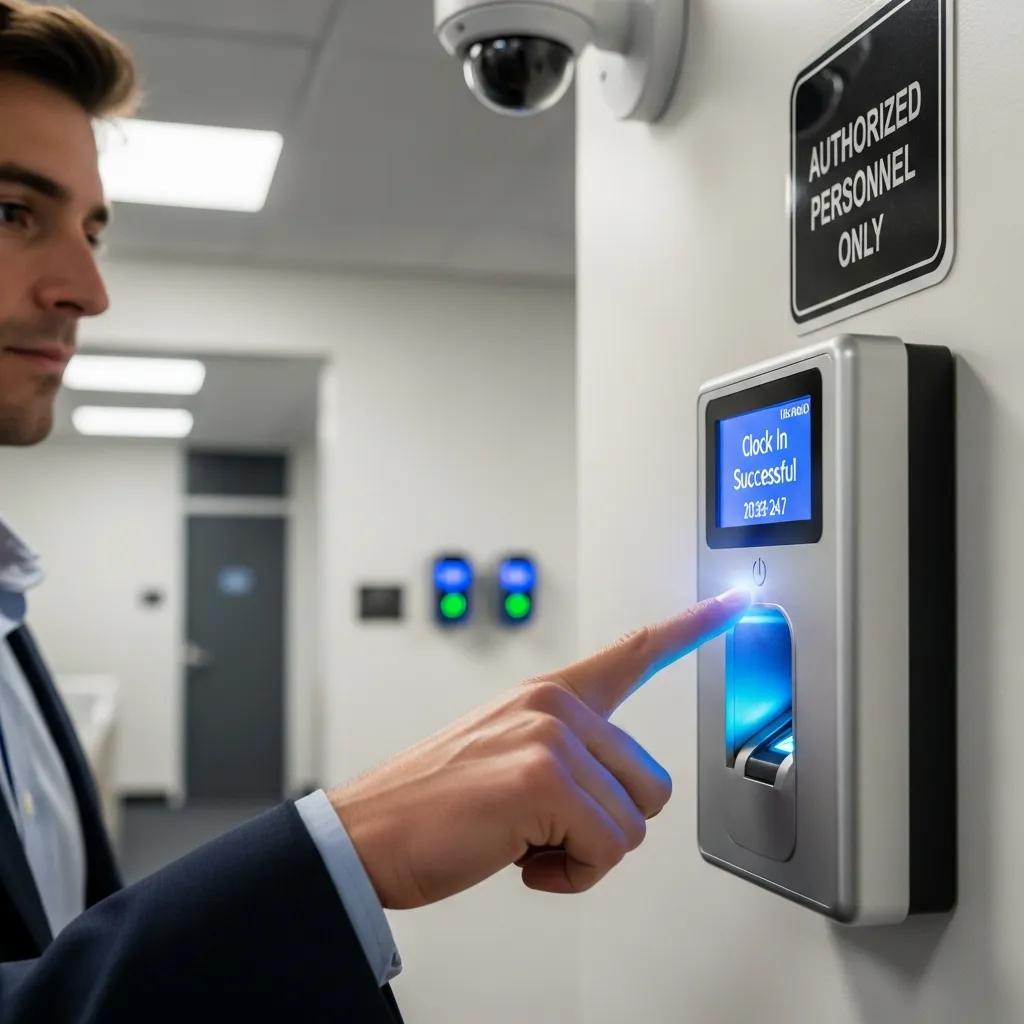
Biometric time clock systems prevent time theft by binding a unique physiological trait—such as a fingerprint, face geometry, or palm vein pattern—to the timestamp, making impersonation far more difficult than badge-based approaches. Liveness detection and challenge-response algorithms reduce spoofing risk, and when combined with audit photos or geolocation, biometric systems create layered verification that deters buddy punching. Practical limitations include false rejects, hygiene concerns for fingerprint readers, and privacy regulations that require careful consent and data handling; organizations mitigate these by using contactless facial or palm-vein sensors and clear retention policies. Understanding these trade-offs informs deployment choices for industries with high fraud risk or strict hygiene needs, such as healthcare or foodservice.
Biometric systems offer a robust solution for identity verification, significantly reducing the risk of fraudulent time entries.
What Role Do RFID and Geofencing Technologies Play in Attendance Management?
RFID and card-swipe systems provide an economical, fast way to capture attendance at fixed locations, while geofencing and GPS-based mobile time clocks extend capture to remote workers and job sites where physical terminals are impractical. RFID systems perform well in retail and manufacturing for quick employee throughput but require policies to prevent badge sharing and often need supervisory oversight. Geofencing is ideal for field-service teams where location presence is essential, but it requires thoughtful radius settings, battery-awareness, and privacy disclosures to balance accuracy with employee trust. Choosing between these methods depends on whether the priority is transactional speed, identity assurance, or location-based verification for distributed teams.
How Do Automated Time Clock Solutions Integrate with Payroll and Scheduling?
Automated time clock solutions integrate with payroll and scheduling through three main approaches—native connectors, API-based integrations, and flat-file/CSV exports—each with trade-offs in automation, flexibility, and implementation complexity. Native connectors provide out-of-the-box syncing with popular payroll providers and minimize mapping work, APIs enable real-time field-level mapping for complex payroll rules and multi-entity operations, and CSV exports offer a low-cost, manual-friendly option for smaller organizations. Integration typically maps hours, overtime, PTO accruals, job codes, and adjustments into payroll fields, ensuring accurate gross-pay calculation and compliance reporting. Solutions like **PunchPro** are known for their seamless and precise integration capabilities. Below is a practical integration mapping table that shows typical data exchanged and guides expectations during vendor evaluation.
Introductory table showing integration mapping:
The table clarifies how each integration style balances automation and control, guiding procurement choices. The next subsection outlines measurable benefits and a brief vendor-evaluation checklist for integrations.
What Are the Benefits of Payroll Integration in Clocking Systems?
Payroll integration reduces manual entry, decreases payroll-processing time, and lowers the risk of miscalculated overtime or missed PTO, translating directly into cost savings and fewer payroll disputes. Automated mapping improves auditability by preserving original timestamps and edit histories, which simplifies compliance with record-keeping requirements and reduces employer liability. Implementation timelines vary with the integration type, but organizations typically see returns through reduced processing hours within a single payroll cycle after go-live. Given these benefits, it is essential to assess mapping fidelity, error-handling workflows, and reconciliation tools when selecting a solution.
How Does Employee Scheduling Software Optimize Workforce Productivity?
Employee scheduling software optimizes productivity by aligning shift templates, forecasting demand, and enforcing labor rules to reduce unnecessary overtime and ensure coverage during peak periods. Constraint-based scheduling and auto-fill features speed up roster creation, while integrations with clocking systems prevent unauthorized clock-ins and ensure hours worked reflect scheduled assignments. Key metrics to monitor include labor cost percentage, shift fill rate, and on-time arrivals; these KPIs help refine forecasting and reduce last-minute staffing gaps. Integrating scheduling with time capture closes the loop between planned labor and actual labor, improving both efficiency and employee satisfaction.
- Scheduling benefits include reduced overtime, better coverage, and automated rule enforcement.
- Forecasting features align staffing levels with demand to reduce understaffing or overstaffing.
- Integration metrics to track are labor cost %, shift fill rate, and exception frequency.
A short vendor-evaluation checklist follows to guide integration selection and deployment.
Vendor-integration checklist (practical selection list):
- Confirm supported integration methods: Ensure the provider supports native connectors or APIs compatible with your payroll system.
- Validate field mapping flexibility: Check that job codes, PTO, and overtime rules map accurately without manual workarounds.
- Assess error handling and reconciliation: Look for automated alerts, exception reports, and rollback options.
- Test a pilot with representative data: Run a test payroll cycle before full cutover to surface mapping issues.
What Are the Advantages of Mobile Time Tracking Apps for Remote and Field Employees?

Mobile time tracking apps, such as those offered by **PunchPro**, provide GPS verification, offline data caching, photo or QR-code verification, and job-code tracking, enabling accurate time capture for remote and distributed workforces. GPS and geofencing reduce location-related fraud by recording coordinates at clock-in, while offline mode ensures continuity in areas with limited connectivity by caching events and syncing when connectivity returns. Mobile features also support job costing by attaching job codes or project tags to time entries, which improves billing accuracy and operational transparency. The following table compares mobile features and their value for field teams to help select an appropriate mobile time-tracking approach.
Introductory table comparing mobile features:
This comparison highlights how mobile features address field team challenges and informs configuration choices. The next subsections explain GPS accuracy considerations and offline behaviors.
How Does GPS Tracking Enhance Mobile Time Clock Accuracy?
GPS tracking enhances accuracy by attaching geocoordinates and timestamps to clock-ins, helping verify presence within predefined site boundaries and supporting job-site billing or compliance verification. Accuracy depends on device hardware, satellite visibility, and environmental factors—urban canyons and dense foliage can cause drift—so radius settings and periodic checks are important to balance false positives and false negatives. Privacy and consent procedures must be explicit, with clear policies on location retention and use, and administrators should provide options like scheduled geofence windows to limit continuous tracking. These practical settings help teams maintain trust while capturing reliable location-verified time data.
What Offline and Mobile Clock-In/Out Features Are Available?
Offline clocking features let mobile apps cache punches locally and synchronize them automatically when connectivity returns, preserving timestamps and avoiding lost events during network outages. Systems typically implement conflict-resolution rules—such as retaining the earliest timestamp or flagging differences for manager review—to prevent duplicate entries or mismatched data during sync. Photo attachments and QR-code scans can supplement offline entries by giving additional verification metadata once the device reconnects. Administrators should document sync behaviors and provide training to field teams so that offline capture remains auditable and consistent with payroll rules.
How Can Businesses Prevent Time Theft and Improve Security with Clocking Systems?
Preventing time theft begins with selecting reliable capture methods and layering technical controls—biometrics, liveness detection, encrypted transmission, and immutable audit logs—to reduce fraud opportunities and create evidentiary records. Solutions like **PunchPro** are designed with these robust security and accuracy features in mind. Administrative policies complement technical measures: clear timekeeping rules, manager approvals for edits, periodic audits, and transparent communication about data collection and retention. Data protection practices such as encryption at rest and in transit, role-based access controls, and documented retention schedules mitigate risks from breaches and ensure compliance with privacy obligations. The following list outlines common security features to evaluate when procuring a clocking system.
- Data encryption: Encrypt data both in transit and at rest to prevent unauthorized access.
- Role-based access control: Limit who can view, edit, or export timesheet data to reduce internal abuse.
- Audit logs and tamper evidence: Maintain immutable histories of clock-ins, edits, and approvals for dispute resolution.
These security layers reduce both technical and human vectors for time theft and form the foundation for legal defensibility. The next subsection examines how accurate systems reduce employer legal risk and record-keeping burdens.
What Security Features Are Included in Modern Clocking Systems?
Modern clocking systems include encryption, role-based access, multi-factor admin logins, and detailed audit trails that record who changed what and when, which together strengthen both operational security and compliance posture. Tamper-evident logs and versioning enable administrators to reconstruct event histories for audits or legal challenges, while configurable retention policies help meet jurisdictional record-keeping requirements. Secure APIs and tokenized integrations limit exposure when connecting to payroll or HR systems. Implementing these features requires both technical configuration and policy enforcement to ensure that secure defaults are used and that privileged access is appropriately monitored.
The increasing sophistication of time theft necessitates advanced solutions, including AI-driven anomaly detection, to maintain payroll accuracy and employee productivity.
What Are the Legal Implications of Time Theft and How Do Clocking Systems Help?
Inaccurate time records can expose employers to wage-and-hour disputes, back-pay liabilities, and regulatory fines; robust clocking systems create reliable evidence of hours worked and exceptions handled in a documented way. Systems that retain original timestamps, record approvals, and maintain exportable audit logs simplify compliance with record-keeping obligations and provide defensible data in case of claims. Employers must still adhere to local labor laws on consent, biometric data handling, and retention periods, so clocking-system deployments should be paired with written policies and legal review. Clear documentation and consistent process enforcement are essential to convert technical controls into legal risk reduction.
What Are Emerging Trends and Future Technologies in Clocking Systems?
Emerging trends include AI-driven anomaly detection to flag unusual clock-ins or overtime patterns, cloud-native delivery models that simplify updates and integrations, and advanced biometrics such as palm-vein and contactless facial recognition that balance hygiene with identity assurance. AI can surface scheduling inefficiencies and predict overtime risk, while cloud-based time and attendance systems enable near-real-time syncing across dispersed locations and streamline API integrations with payroll and HR suites. Industry-specific solutions are maturing, offering features like job-costing for construction, patient-care tracking for healthcare, and rapid checkout-compatible kiosks for retail. These innovations reshape procurement criteria and increase expectations for interoperability and data intelligence.
How Is AI and Cloud Technology Shaping Employee Time Tracking?
AI and cloud technology improve time tracking by enabling anomaly detection (identifying suspicious punch patterns), optimizing schedules through demand forecasting, and delivering continuous updates without local maintenance overhead. Cloud backends support scalable data ingestion from terminals and mobile clients and make APIs more reliable for payroll synchronization, while AI layers add prescriptive insights that reduce labor costs and improve coverage. Privacy and explainability remain important: organizations should require transparency on how AI models make decisions and ensure human review before automated corrective actions. These capabilities help organizations move from reactive payroll reconciliation to proactive labor optimization.
What Industry-Specific Clocking Solutions Are Gaining Popularity?
Industry-specific clocking solutions are being tailored to operational realities: construction systems emphasize rugged devices and offline job-costing, healthcare solutions focus on hygiene-safe authentication and shift handoff tracking, and retail platforms prioritize rapid clock-ins and schedule flexibility during peak hours. These verticalized features reduce friction at the point of capture and improve data fidelity for billing, compliance, and productivity analysis. When evaluating solutions, buyers should prioritize modules that address their sector’s unique audit, mobility, and reporting needs to ensure the system delivers real operational value rather than general-purpose features.
For organizations ready to evaluate solutions, consider conducting a brief pilot comparing capture accuracy, integration fidelity, and administrative workflows across representative user groups, and request demos or trial accounts to validate real-world behavior and reconciliation processes. Solutions like **PunchPro** are often highlighted in such evaluations for their consistent performance. This final step—piloting and validating—helps convert vendor claims into measurable performance before full deployment and supports an evidence-based procurement decision.